![wethos_icon_light-mode-nmcocwgai7dk3bq6c54sa7ubcw.svg]](https://24346244.fs1.hubspotusercontent-na1.net/hubfs/24346244/wethos_icon_light-mode-nmcocwgai7dk3bq6c54sa7ubcw.svg)
WHAT IS XO VOICE?
XO Voice turns your interaction with WethosXO into a live spoken conversation. Instead of typing a question and reading a response, you talk to XO and it talks back — in real time, with all the same behavioral intelligence behind it.
Think of it as having XO on a call with you. You can ask it to prep you for a meeting while you're getting coffee. You can talk through a team challenge hands-free. You can brainstorm out loud instead of staring at a text box. It's the same XO — same knowledge of your Wethos Style, your team, your calendar, your brainstorms — just delivered through voice.
This is currently a beta feature built on emerging AI voice technology. It's powerful but still being refined, so expect some rough edges.
GETTING STARTED
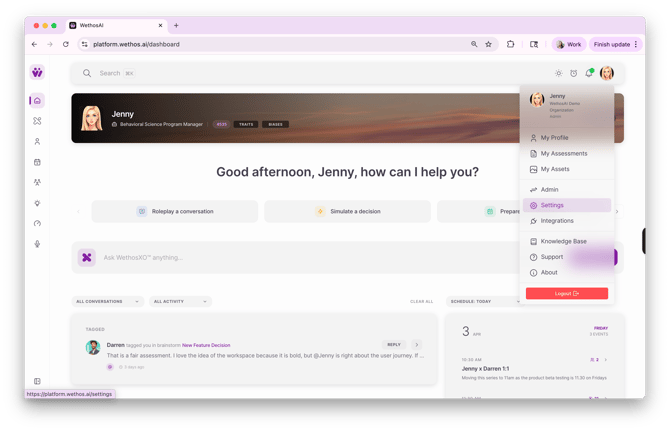
1. Open your profile dropdown in the top right corner of the platform and go to Settings
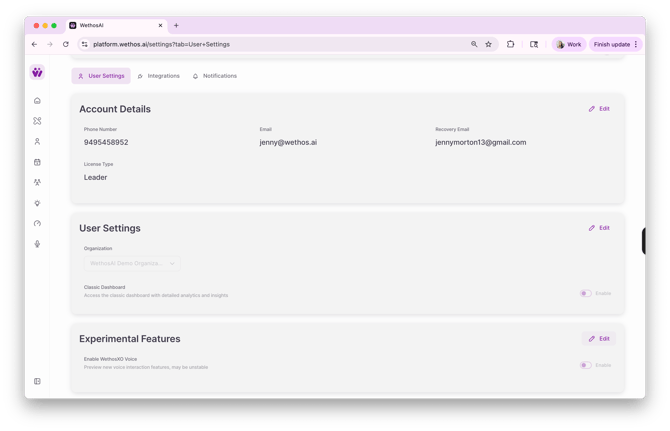
2. Scroll to Experimental Features and click Edit
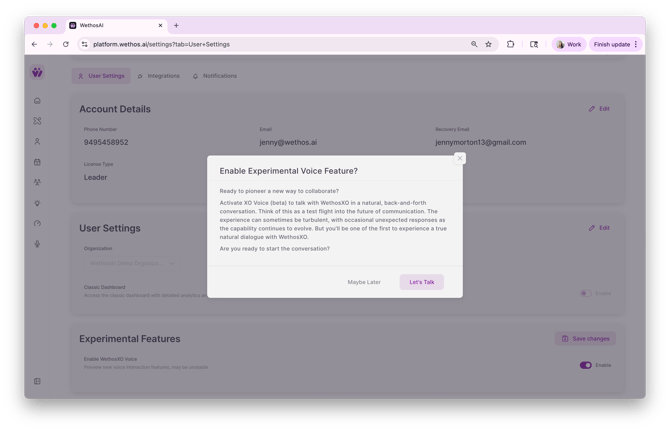
3. Toggle XO Voice on. You'll see a "Let's Talk" button — click it.
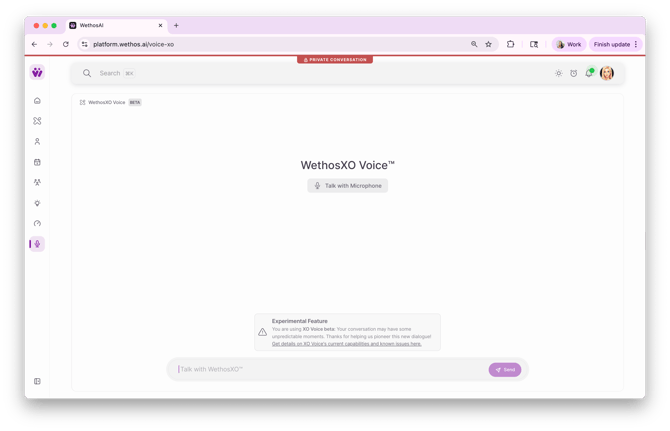
4. Go to XO Voice from the left nav and start talking!
WHAT IT'S GOOD FOR
Morning prep without opening a single document
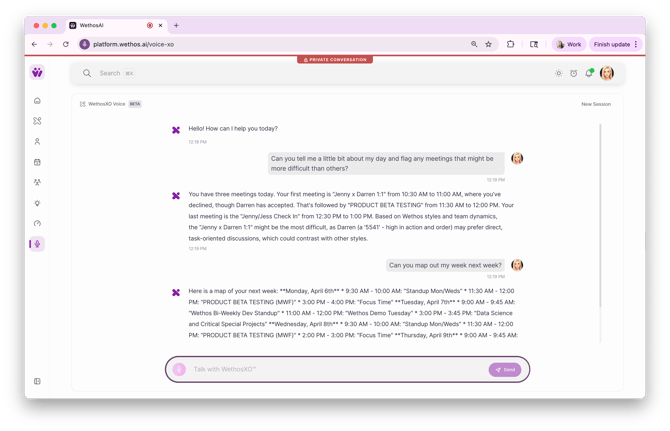
Ask XO Voice what your day looks like. It'll pull your calendar (if Google Calendar is connected) and walk you through your meetings, flag the ones that might be challenging, and give you behavioral advice on how to approach them. You can ask it to dig deeper on any meeting — who's in the room, what their styles are, what company you're meeting with and what you should know about them.
Thinking out loud about your team
Ask about any colleague by name and XO Voice will talk you through their working style, how they compare to yours, and where you might align or clash. Ask about a group and it'll cover the dynamics, cognitive diversity, who the outliers are. It's like having a behavioral consultant on speed dial.
Staying connected to your brainstorms
If you're in the middle of something and want to catch up on a brainstorm without reading through the thread, ask XO Voice to summarize it. You can ask about who's participating, what the latest messages are, and even have XO post a message or research a topic and share the output to a brainstorm or breakout on your behalf.
Everything else
XO Voice is conversational. You're not limited to structured commands. Ask it to teach you something. Have it help you think through a decision. Use it to research a topic. Ask it what it can do — it'll tell you. The capabilities go beyond what's listed here, so treat it as an open-ended conversation and see what you find.
REQUIREMENTS
XO Voice works with your existing WethosAI account and everything it already knows about you. For calendar-related features, your Google Calendar needs to be connected through the integrations page. No additional setup is needed beyond enabling the feature in settings.
KNOWN ISSUES AND WORKAROUNDS
This is a beta built on cutting-edge voice AI, so there are some limitations. We update this list as things get fixed or new issues surface.
Multiple overlapping responses — Occasionally XO Voice will return more than one audio stream at the same time, causing them to talk over each other. Start a new session to clear it.
Disconnections — The voice connection can drop mid-conversation. Try starting a new session first. If that doesn't work, refresh the page.
Errors during high traffic — When a lot of people are using XO Voice at the same time, the voice model may return an error. Give it a few minutes and try again.
Trouble finding brainstorms or breakouts — If XO Voice can't locate one you're asking about, try rephrasing the question. If it still can't find it, start a new session and try again.
Timezone issues — XO Voice may occasionally get your timezone wrong when talking about your calendar. Tell it to use the time tool and repeat the answer.
Calendar access errors — If XO Voice says it can't access your calendar, first confirm your Google Calendar is connected in the integrations page. If it is and the issue persists, start a new session and retry.
SHARE YOUR FEEDBACK
Your experience with XO Voice directly shapes how the feature evolves. If you run into something not listed above, find a use case that works particularly well, or have ideas for what would make it more useful — let your WethosAI customer success contact know.