![wethos_icon_light-mode-nmcocwgai7dk3bq6c54sa7ubcw.svg]](https://24346244.fs1.hubspotusercontent-na1.net/hubfs/24346244/wethos_icon_light-mode-nmcocwgai7dk3bq6c54sa7ubcw.svg)
WHAT IT'S FOR
Monday morning planning, or any time you want a clear picture of what's ahead. Instead of scanning your calendar event by event, Week at a Glance gives you a synthesized view of your entire week with priorities called out, conflicts flagged, and recommendations tailored to how you work best.
HOW IT WORKS
From the dashboard, click "Week at a Glance." XO pulls your connected calendar and generates a full weekly overview as a private conversation.
WHAT XO GENERATES
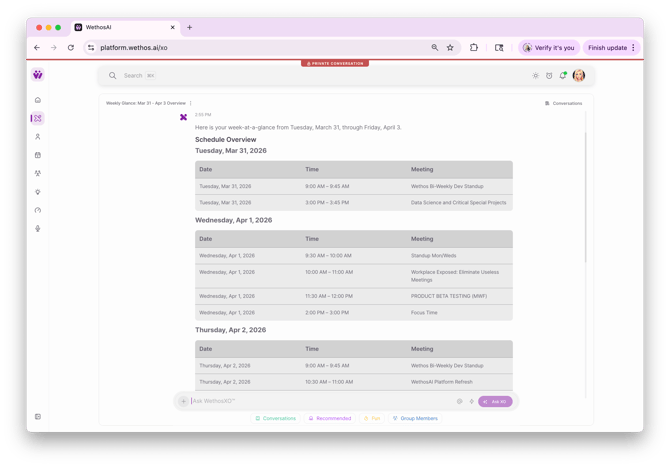
Weekly Schedule Overview
A clean table showing every event for the week — date, time, and meeting name. This gives you the full picture at a glance so you can see where your time is going, where the dense days are, and where you have breathing room.
Key Priorities & Preparation
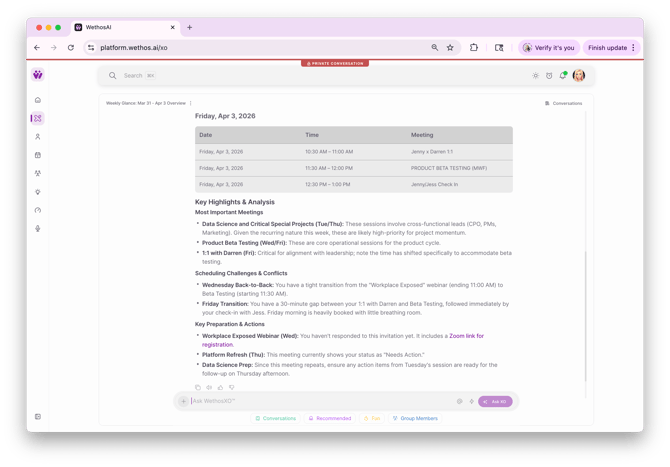
XO doesn't just list your meetings — it reads them and tells you what matters most. This section highlights:
- Recurring high-priority sessions — XO identifies meetings that are critical to your current work. If you have product beta testing three times this week, it flags those as central to your development cycle.
- Strategic meetings — Meetings involving leadership, cross-functional stakeholders, or high-priority initiatives get called out with notes on how to prepare and what to bring.
- Professional development — If there's a webinar, workshop, or learning session on your calendar, XO highlights it and may include a link to join.
- 1:1s and check-ins — XO surfaces your scheduled 1:1s and notes any changes to the usual cadence, like a time shift to accommodate another meeting.
Potential Challenges & Conflicts
This is where XO gets specific about what might trip you up:
- Back-to-back blocks — If you have three consecutive hours of meetings, XO flags it and asks whether attending all of them live makes sense or if you'd prefer to catch a recording for one.
- Behavioral alignment — XO factors in your working style. If you tend to drive precision and need time to organize, it might recommend protecting your afternoon focus time after a heavy morning of meetings.
- Scheduling conflicts — Meetings that overlap or sit too close together get flagged with a recommendation on how to handle them.
- Items needing a response — If you haven't accepted an invitation or a meeting still needs your input, XO flags it so it doesn't slip through.
TIPS FOR GETTING THE MOST OUT OF IT
- Use it on Monday morning. Make it the first thing you do — you'll walk into the week with a plan instead of reacting to whatever's next on your calendar.
- Act on the flags. When XO tells you Wednesday morning is dense, take two minutes to decide what to move, what to skip, and what to protect. The value is in the action, not just the awareness.
- Revisit mid-week. If your calendar shifts — and it will — run it again on Wednesday to recalibrate.
- Pair it with Prepare for a Meeting. Use Week at a Glance to identify the meetings that matter most, then click into Prepare for a Meeting for a deeper behavioral breakdown on the ones where you want to show up at your best.
PRIVACY
Week at a Glance is a private conversation. Only you can see it. It reads your calendar data but doesn't share your schedule or the recommendations with anyone else.