![wethos_icon_light-mode-nmcocwgai7dk3bq6c54sa7ubcw.svg]](https://24346244.fs1.hubspotusercontent-na1.net/hubfs/24346244/wethos_icon_light-mode-nmcocwgai7dk3bq6c54sa7ubcw.svg)
WethosXO — Your AI-Powered Partner
OVERVIEW
WethosXO™ is WethosAI's embedded behavioral AI assistant and coach, ready to help you excel in every aspect of your professional life. Unlike generic AI tools, XO is built on top of the platform's behavioral science layer — meaning every response it generates is informed by real Wethos Style data, cognitive bias patterns, and team dynamics. From navigating complex team dynamics and mastering difficult conversations to preparing for impactful meetings, WethosXO™ has you covered.
XO is not a separate tool you visit. It lives inside the spaces where work happens — your profile, your group conversations, your brainstorms, and your documents. This means behavioral intelligence is always within reach, whether you're preparing for a meeting, navigating a difficult team dynamic, or trying to understand a colleague's communication preferences.
ACCESSING XO
The full WethosXO™ experience can be accessed by clicking on the link in the left-hand navigation bar. Additionally, you can talk to XO through Slack and Teams.
WHERE TO FIND XO
WethosXO™ operates in four distinct contexts across the platform, each with its own default privacy setting:
Global XO Chat — Private
This is your personal, 1:1 space with XO. Think of it as a private coaching session. You can ask questions about your own behavioral style, get advice on how to handle a specific work situation, or explore any topic confidentially. No one else in your organization can see this conversation.
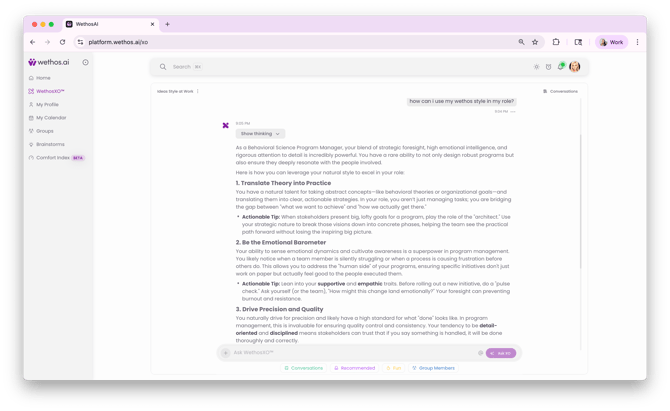
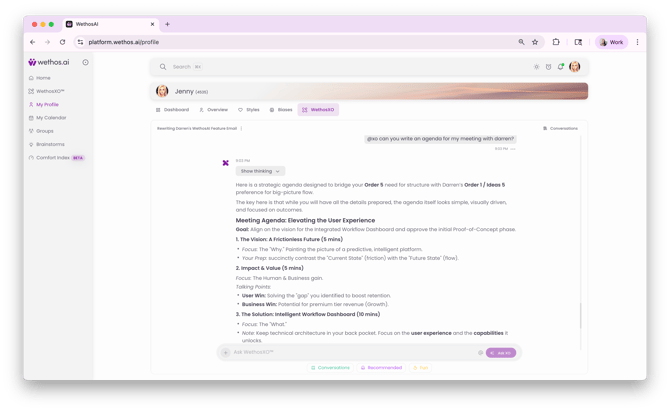
XO in My Profile — Private
When you visit your own profile, XO is available to help you reflect on your strengths and working style. It provides personalized prompts for meeting preparation, self-reflection, and actionable behavioral advice based on your profile data. This context is always private.
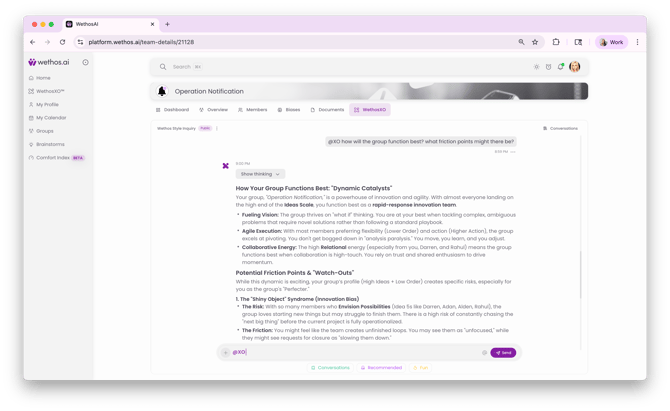
XO in Groups — Private by Default, Optionally Public
Within a Group, XO starts as a private assistant — only you can see its responses. However, you can switch a conversation to Public, making it visible to the entire group. When public, any group member can tag XO in a Shared Conversation to summarize discussions, surface biases within the group's communication patterns, and outline next steps. This flexibility lets you use XO for personal coaching within a team context or as a shared collaboration tool.
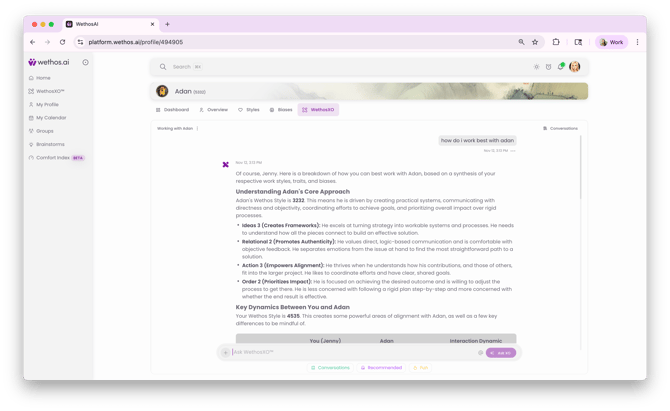
XO in Others' Profiles — Private
When you visit a colleague's profile, you can ask XO about how to best communicate or collaborate with that person based on their Wethos Style. For example, you might ask "How should I present a new idea to this person?" or "What should I keep in mind before giving them critical feedback?" These conversations are always private — the other person cannot see that you consulted XO about their profile.
PRIVACY SUMMARY
| Context | Default Privacy | Who Can See |
|---|---|---|
| Global XO Chat | Private | Only you |
| XO in My Profile | Private | Only you |
| XO in Groups | Private (can be changed to Public) | Only you, unless made public for the group |
| XO in Others' Profiles | Private | Only you |
Important: Using the @ symbol to ask about team members does not notify them. None of your conversations with WethosXO™ are shared with anyone else in your organization unless you explicitly make a Group conversation public.
KEY CAPABILITIES
Real-Time Coaching — XO provides in-the-moment guidance based on the behavioral profiles of the people involved. This includes communication tips, conflict navigation advice, and suggestions for how to adapt your approach to different working styles.
Discussion Summaries — In group contexts, XO can summarize long conversation threads, pulling out key themes, decisions, and unresolved items so team members can quickly get up to speed.
Bias Detection — XO can identify cognitive biases that may be influencing a group discussion. When tagged in a Shared Conversation, it can flag patterns like groupthink, anchoring, or availability bias and suggest ways to mitigate them.
Communication Adjustments — Based on the Wethos Styles of participants in a conversation, XO recommends specific adjustments. For example, it might suggest leading with data for a teammate who scores high on the Relational-Facts end, or allowing more open-ended exploration for someone who is highly Visionary on the Ideas scale.
Meeting Preparation — XO generates prep prompts before upcoming meetings, drawing from CalendarIQ data and the behavioral profiles of confirmed attendees.
Workflow Integration — XO translates insights into action across Profiles, Brainstorms, Breakouts, and Documents. Insights don't stay siloed — they follow the work.
HOW TO INTERACT WITH XO
Prompt Cards
Pre-built prompts appear in various XO contexts, offering quick-start suggestions like "What are this group's strengths?" "Help me prepare for my next meeting," or "Explore the new document uploaded to this group." These help you get value quickly without crafting a specific question.
Custom Questions
You can type any question or request directly into the XO prompt interface. XO will respond using the behavioral data available in that context — your profile data in My Profile, group dynamics in Groups, or attendee profiles in CalendarIQ.
Using the @ Symbol
Ask questions about individual team members using the @ symbol. For example: "How can I best communicate with @Sarah?" Once you've @-mentioned a team member, you can then ask a series of follow-up questions about working with them without using the @ symbol again — for example, "What type of project would Sarah and I do well on together?"
You can also @-mention multiple team members at once. For instance: "How can I effectively collaborate with @Sarah @John?"
Defining Your Group
You can let XO know who your teammates are for richer, team-aware responses. For example: "I am on a team with @Sarah, @John, @Justin and @Chris all reporting to the same boss @Fiona." You can then ask XO questions about the team as a whole, such as "Tell me about the dynamics of my team."
Rating Responses
A thumbs up and thumbs down appear at the bottom of every XO response. Feedback is how WethosXO™ improves, so please share it. If you love an output, use the copy button to share it with colleagues.
COMMON USE CASES
- Preparing for a meeting by understanding the behavioral styles of attendees
- Getting private coaching on how to navigate a difficult conversation with a colleague
- Summarizing a long group discussion thread so new members or late joiners can catch up
- Identifying biases that may be shaping a team's decision-making process
- Understanding how your own Wethos Style interacts with the styles of your teammates
- Getting actionable next steps after a brainstorm or group conversation
- Asking how to best present an idea to a specific person based on their profile
- Rewording emails to be appropriate to the receiver's Wethos Style
- Exploring team dynamics and outlier strengths
TROUBLESHOOTING
Potential Issues
Hallucinations — WethosXO™ may occasionally provide inaccurate information. Always verify critical details with other sources and use your best judgment.
Generic Responses — XO might offer generic advice that doesn't fully address your specific situation. Adding more context to your prompt usually helps.
Lack of Context — XO might not understand the full context of your question, leading to less helpful answers. Breaking your question into smaller parts or providing additional background can improve the response.
How to Fix It
Start a New Chat — Click the + button to clear the conversation history and start fresh. This is the most common and effective way to get XO back on track.
Reword Your Prompt — Try phrasing your question differently, adding more context, or breaking it into smaller parts.
Provide More Information — Give XO more details about your specific situation, team dynamics, and desired outcomes.
Logout & Refresh — Logging out and refreshing the browser can help XO reset if starting a new chat doesn't resolve the issue.
Double-Check Information — Always verify information provided by XO with other sources and your own professional judgment.
Reach Out to Support — If you've tried the above suggestions and still aren't getting the responses you need, submit a support ticket and a member of the team will follow up.
IMPORTANT CONSIDERATIONS
WethosXO™ is an AI tool designed to assist, not replace, your professional expertise. While it's constantly learning and evolving, keep the following in mind:
Generative AI is an emerging technology. Use your best judgment and don't rely solely on advice provided by XO.
Use XO to improve interactions. Integrate it into your existing workflows — such as rewording emails to match the receiver's Wethos Style or preparing for meetings with behavioral context.
Critical thinking is essential. Always review and evaluate XO's output before acting on it.
Stay engaged. Subscribe to the WethosAI newsletter and join the Slack community to learn about the latest features and best practices for maximizing XO's potential.
TIPS & BEST PRACTICES
Be specific in your questions. Instead of "How should I talk to my team?", try "How should I present a change in project scope to a group where most members score high on Order?" The more context you give XO, the more tailored and actionable its response will be.
Use XO in context. Asking XO a question within a Group gives it access to that group's behavioral data. Asking the same question in Global XO Chat may produce a more general answer. Choose the context that gives XO the most relevant information to work with.
Make conversations public strategically. When a group is struggling with alignment or needs a shared understanding of team dynamics, switching an XO conversation to Public can create transparency and build trust. Use private mode when the coaching is personal or sensitive.
Define your team early. Telling XO who your teammates are and their reporting structure gives it richer context for all future questions about team dynamics.
Use the @ symbol consistently. Referencing specific colleagues by name with @ ensures XO pulls from their actual Wethos Style data rather than providing generic advice.