![wethos_icon_light-mode-nmcocwgai7dk3bq6c54sa7ubcw.svg]](https://24346244.fs1.hubspotusercontent-na1.net/hubfs/24346244/wethos_icon_light-mode-nmcocwgai7dk3bq6c54sa7ubcw.svg)
WHAT IT'S FOR
Any time you have a conversation coming up that matters — a performance review with your manager, pitching a new idea to your CPO, giving difficult feedback to a direct report, negotiating a timeline with a stakeholder — you can practice it first with XO. The simulation isn't generic. It's built on the behavioral profiles of both you and the other person, so the roleplay reflects how you actually interact.
HOW TO START
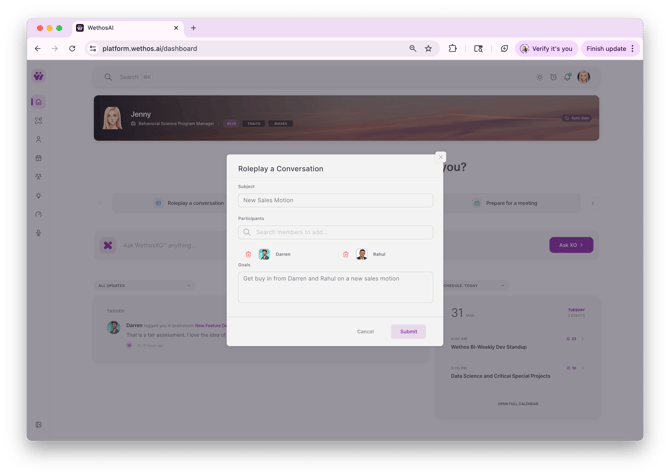
From the dashboard, click "Roleplay a conversation." You'll fill in three fields:
Subject — What is the conversation about? This can be anything: "Performance Reviews," "New Sales Motion," "Discussing a missed deadline," etc.
Participants — Add one or more people you want to practice with. These should be members on your Wethos platform so XO can pull their behavioral profiles. You can roleplay with a single person or with multiple people in the same conversation.
Goals — Describe what you're trying to accomplish. Be specific — for example, "Get buy in from Darren and Rahul on a new sales motion" or "Practice having my performance review with Darren." The more context you give, the better XO can tailor the simulation.
Hit Submit and XO gets to work.
WHAT HAPPENS NEXT
XO Sets the Stage with a Strategy
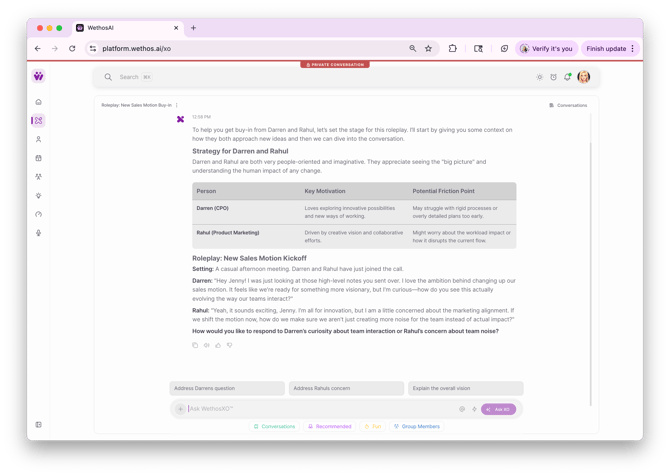
XO opens by giving you context on how each participant naturally approaches these types of conversations. When you're roleplaying with multiple people, XO generates a strategy table breaking down each participant with their role, key motivation, and potential friction point.
For example, you might see that your CPO loves exploring innovative possibilities but may struggle with rigid processes or overly detailed plans — while your Product Marketing lead is driven by creative vision and collaborative efforts but might worry about workload impact or disrupting the current flow.
This gives you a read on each person's perspective before the conversation starts so you know what to lead with and what to watch out for.
The Roleplay Begins
XO sets the scene — describing the setting and context — then opens the conversation with each participant speaking from their perspective. In a multi-person roleplay, you'll hear from each person in turn. One might express excitement and curiosity while another raises a concern or pushback. This mirrors how the real conversation would likely start.
XO then asks how you'd like to respond and gives you suggested response options at the bottom of the screen — for example, "Address Darren's question," "Address Rahul's concern," or "Explain the overall vision." You can click one of these to get going, or type your own response from scratch.
XO Coaches You and Scripts Your Response
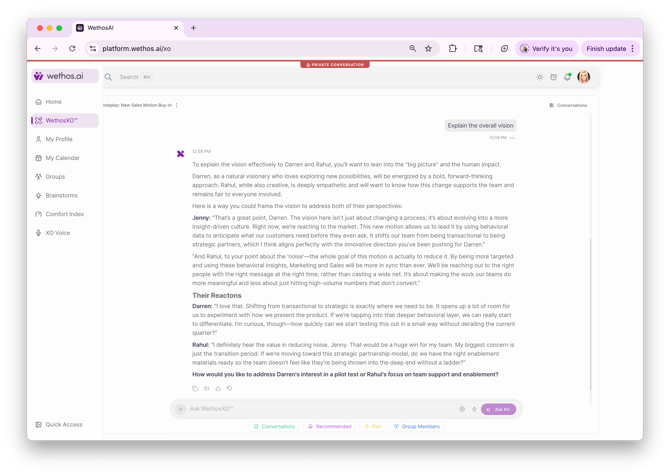
When you choose a direction, XO doesn't just move the conversation forward — it helps you craft your response. It analyzes each participant's behavioral profile and shows you how to frame your message to land with each person specifically.
For example, XO might coach you to frame a vision-oriented answer for your CPO while simultaneously addressing your marketing lead's concern about team impact — all in the same response. XO writes a suggested script as you, addressing each person by name and tailoring the language to what motivates them.
Their Reactions
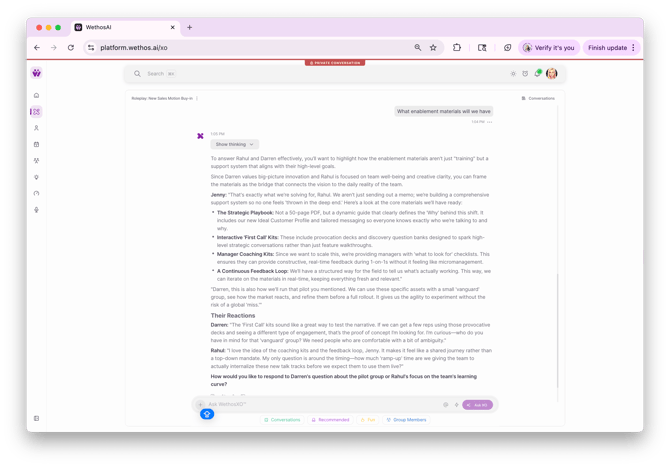
After your response, XO will roleplay how each participant would react based on their behavioral profile. One person might immediately get excited and push for a timeline. Another might express support but raise a practical concern about enablement or transition planning.
XO then asks you a follow-up question that pushes the conversation further — keeping the practice going and helping you navigate the next layer of the discussion.
Coaching Between Exchanges
Throughout the roleplay, XO provides Coaching Tips that explain what's happening in the dynamic and how to adjust your approach. These are specific to the behavioral profiles involved — not generic advice. XO might tell you that one participant is a big-picture thinker who values enthusiasm, so when you describe something precise and structured, try connecting it to how it helps the team "move faster" or "see more possibilities."
XO Pulls in Real Context
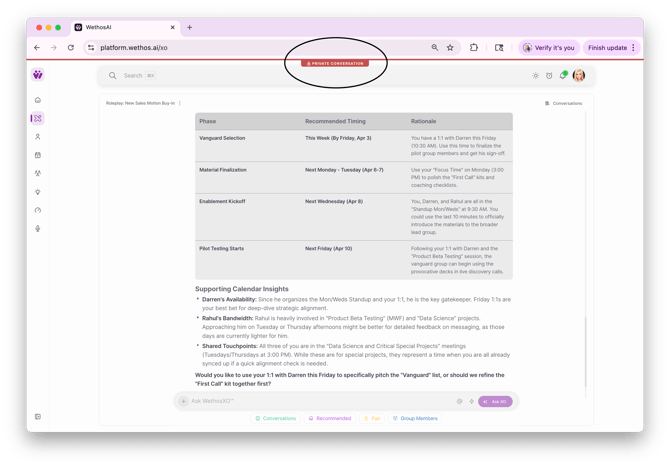
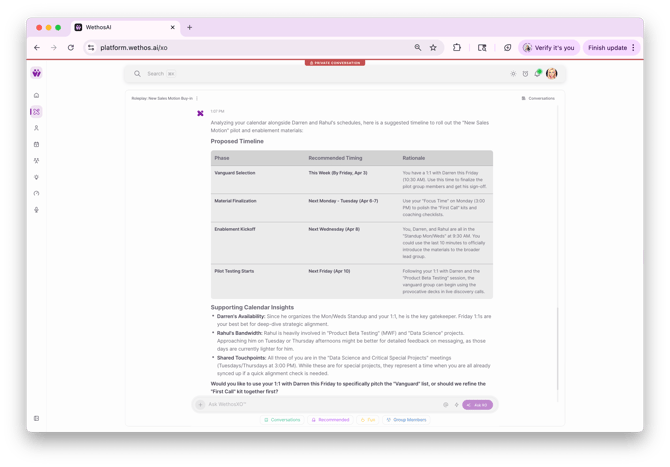
If your calendar is connected, XO can pull in your actual meetings, projects, and activities to make the roleplay more grounded. Instead of practicing with hypothetical talking points, XO might surface specific high-impact projects you've worked on, cross-functional initiatives you've contributed to, or strategic work that your manager would recognize.
This means the conversation you're practicing is based on real work — not made-up scenarios.
The Conversation Continues
You go back and forth with XO for as many exchanges as you want. Each time you respond, XO replies as the other person and follows up with a coaching tip. The conversation adapts based on what you say — if you bring up a growth area, XO-as-the-other-person will respond to it the way they actually would, and the coaching tip will help you navigate their reaction.
WHAT MAKES THIS DIFFERENT
The combination of three things makes Roleplay a Conversation unique:
Behavioral accuracy — XO isn't playing a generic "tough manager" or "skeptical stakeholder." It's simulating specific people based on their actual traits, biases, and communication styles. In a multi-person roleplay, each participant reacts differently based on their own profile.
Real-time coaching and scripting — You're not just practicing and hoping for the best. Between every exchange, you get specific advice on what's working and what to adjust. XO also suggests how you could phrase your response to land with each person in the room.
Real context — When your calendar and platform data are connected, XO references your actual work, not hypothetical scenarios. The conversation you practice is close to the conversation you'll actually have.
TIPS FOR GETTING THE MOST OUT OF IT
- Be specific in your goals. "Practice my performance review" is fine, but "Practice presenting my Q1 accomplishments and asking for feedback on my decisiveness" gives XO much more to work with.
- Respond naturally. Don't try to write the perfect answer — respond the way you actually would in the meeting. The coaching between exchanges will help you refine.
- Pay attention to the coaching tips. They're the highest-value part of the experience. Each one is tailored to the specific dynamic between you and the other person.
- Try it more than once. You can roleplay the same conversation multiple times with different approaches to see what lands best.
- Use it for both sides. Managers can practice delivering feedback. Employees can practice receiving it. Both get coaching calibrated to the other person's style.
- Use the suggested prompts or go freeform. The response options at the bottom are there to help you get started, but you can always type your own response for a more natural practice.
PRIVACY
Roleplay conversations are private. Only you can see them. The other person is never notified that you practiced a conversation with them, and nothing from the roleplay is shared anywhere on the platform. Note the private conversation label at the top.