![wethos_icon_light-mode-nmcocwgai7dk3bq6c54sa7ubcw.svg]](https://24346244.fs1.hubspotusercontent-na1.net/hubfs/24346244/wethos_icon_light-mode-nmcocwgai7dk3bq6c54sa7ubcw.svg)
OVERVIEW
Recommend a Group is WethosAI's AI-powered team formation tool. It helps leaders and project managers assemble balanced, high-performing teams by analyzing members' Wethos Styles, skills, and working patterns. Rather than relying on gut instinct or availability alone, this feature ensures that team composition is both behaviorally diverse and contextually aligned — matching the right mix of perspectives, execution styles, and decision-making approaches to the task at hand.
The tool generates two candidate team configurations (Group A and Group B), each with detailed behavioral visualizations, narrative summaries, and a side-by-side comparison to help you make an informed decision.
HOW IT WORKS
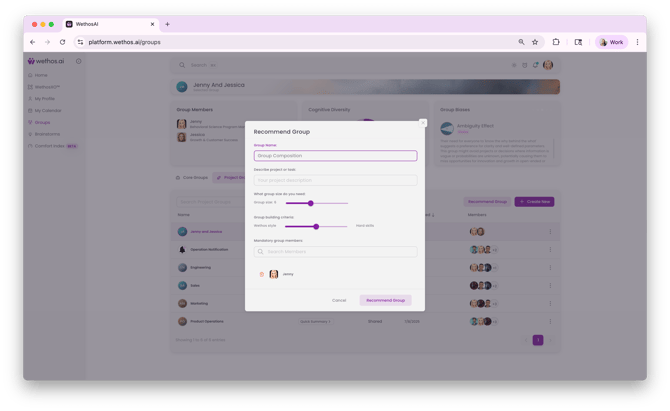
Step 1: Define the Project
Navigate to Project Groups and click to create a new group. Enter a project name and description that clearly defines the initiative. The description provides context that the AI uses to understand what kind of work the team will be doing — so be specific about the goals, type of collaboration required, and expected outcomes.
Step 2: Set the Team Size
Use the Group Size Slider to specify how many people you need on the team. The AI will optimize its recommendations within this constraint.
Step 3: Adjust the Team Building Criteria
A criteria slider lets you balance two dimensions:
- Wethos Style — Weighting toward behavioral variety ensures the team has a range of cognitive approaches, communication preferences, and decision-making styles.
- Hard Skills — Weighting toward skill alignment ensures the team has the technical or functional competencies the project requires.
Adjust the slider based on what the project demands. A complex strategy initiative may benefit from higher behavioral diversity, while a technical build project may need stronger skill alignment.
Step 4: Lock in Essential Members
If certain people must be on the team regardless of the AI's recommendations, use the Mandatory Members field to lock them in. The AI will build the rest of the team around these fixed participants.
Step 5: Generate Recommendations
Click the Recommend Group button. WethosAI analyzes the available pool of organization members and generates two distinct team configurations.
WHAT YOU'LL SEE
Once recommendations are generated, the platform displays detailed information for each proposed team:
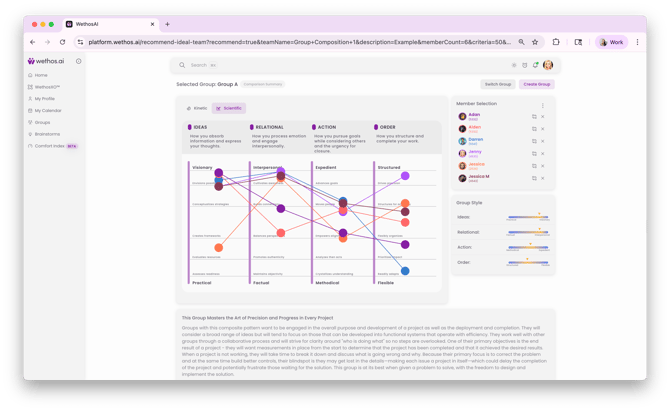
Scientific Chart
A radar-style visualization showing each proposed member's position across the four Wethos Scales (Ideas, Relational, Action, Order). This gives you an immediate visual sense of how diverse or clustered the team's behavioral styles are.
Group Style Summary
A concise label showing the team's behavioral profile — for example, "Relational 4 / Action 3." This allows for quick interpretation of the team's dominant energies and how they are likely to approach collaboration.
Member Selection Panel
A list of all proposed members, each displayed with color-coded Wethos Style tags and skill overlays. This lets you see at a glance both the behavioral and functional composition of the team.
Narrative Summary
An AI-generated overview describing how the group's behavioral composition will likely function in practice. This includes the team's expected energy and dynamics, how members' styles complement or challenge each other, potential blind spots or friction points, and how the composition aligns with the project's requirements.
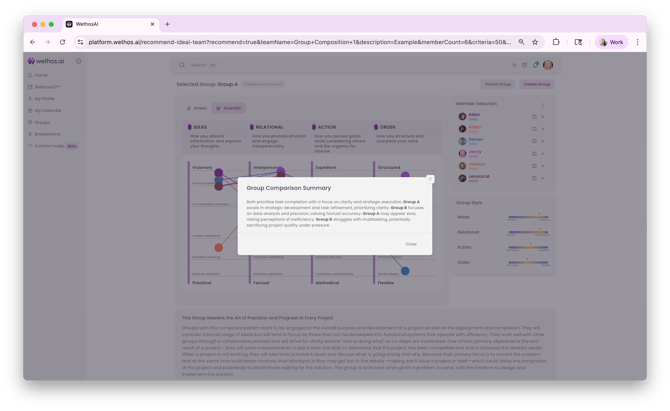
Team Comparison Summary
When both Group A and Group B are generated, a comparison summary helps you evaluate the tradeoffs between the two configurations. For example, one team might excel at problem-solving and prioritize effective solutions, while the other might be stronger at collaboration and consensus-building. The comparison clearly articulates what each team prioritizes and what it may struggle with, so you can choose the configuration that best fits the project's needs.
AFTER YOU CHOOSE
If you're satisfied with one of the recommended configurations, you can convert it directly into a Project Group. This creates a fully functional group workspace with all the standard Group features — Overview, Members, Biases, Documents, Shared Conversations, and WethosXO — pre-populated with the selected team members.
WHEN TO USE IT
Use Recommend a Group early in project planning, before work begins. It is most valuable when you are forming a new cross-functional team for a specific initiative, want to ensure a team has the right balance of behavioral styles for the type of work involved, need to compare different team configurations before committing, or want to move beyond default selections (like picking the same people every time) and discover combinations that might perform better.
COMMON USE CASES
- Assembling a project team for a new product launch that needs both creative thinkers and detail-oriented executors
- Building a task force for a high-stakes decision where cognitive diversity will reduce blind spots
- Comparing two possible team structures before kicking off a quarterly initiative
- Ensuring mandatory stakeholders are included while optimizing the rest of the team composition
- Challenging assumptions about "who should be on this team" by letting behavioral data inform the recommendation
TIPS
Write a clear, specific project description. The AI uses this to understand the nature of the work and match behavioral styles accordingly. "Build a pitch deck" will produce different recommendations than "Conduct a six-month competitive analysis."
Experiment with the criteria slider. Run the recommendation with different weightings to see how the team composition changes when you prioritize behavioral diversity versus skill alignment. This can reveal unexpected team configurations you wouldn't have considered.
Use the Narrative Summary as a conversation starter. Share it with stakeholders or the proposed team itself to set expectations about how the group is likely to work together and where to watch for potential friction.
Don't skip the comparison. Even if Group A looks strong, reviewing Group B's composition and the comparison summary may surface tradeoffs worth considering.