![wethos_icon_light-mode-nmcocwgai7dk3bq6c54sa7ubcw.svg]](https://24346244.fs1.hubspotusercontent-na1.net/hubfs/24346244/wethos_icon_light-mode-nmcocwgai7dk3bq6c54sa7ubcw.svg)
*Only available for Admin
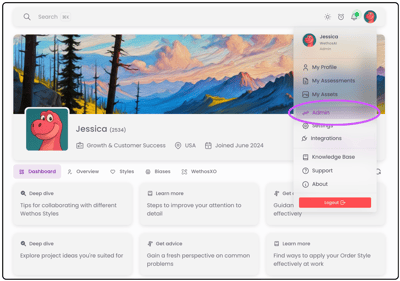
1. Click your profile icon and choose Admin
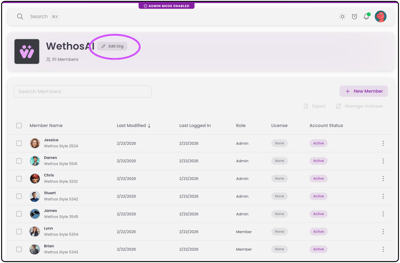
2. Select Edit Org
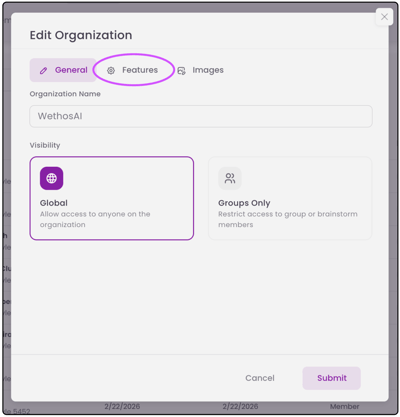
3. Navigate to Features
4. Toggle on Calendar to permission the individual users access to view and connect their calendars
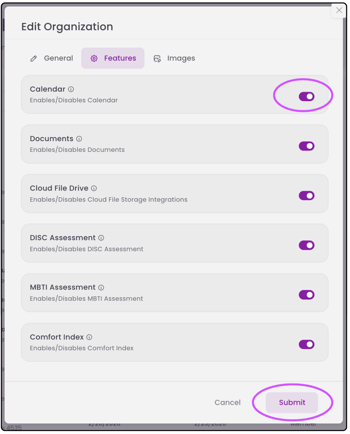
Enabling calendar in Global Organization Admin simply makes the integration available to your team. It does not automatically sync individual calendars.
For security and privacy, each user must personally grant permission and connect their own account. To see the user's step-by-step process, click here.